
Bliv mere effektiv med Visual Studio Code
Jeg er ikke ekspert i kodning – og derfor læner jeg mig op ad enkle værktøjer. Her er to af dem: automatisk formatering og AI, der skriver kommentarerne.
Introduktion
Lad mig sige det med det samme – jeg er ikke ekspert i kodning. Og det er præcis derfor, jeg læner mig op ad enkle værktøjer, praktiske tricks og en smule hjælp fra AI, så jeg kan arbejde mere effektivt og få tingene fra hånden.
Her er nogle af de værktøjer og vaner, jeg bruger dagligt.
Automatisk formatering
En af de bedste ting, jeg har opdaget på det seneste, er muligheden for at formatere kode automatisk. For en som mig, der godt kan lide struktur, er rodet kode ikke til at holde ud. 😂
Heldigvis er det pærenemt: tryk ALT + SHIFT + F, og som ved et trylleslag står koden pænt formateret. Du skal blot have den rigtige udvidelse installeret til det sprog, du arbejder i. For mig er det PowerShell-udvidelsen til VS Code.
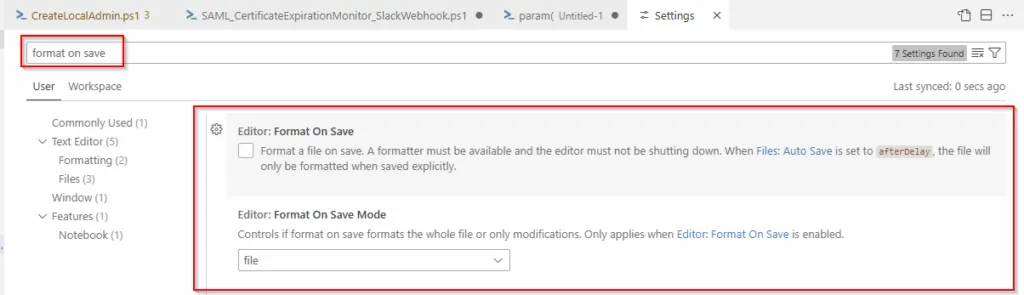
Du kan også gå ind i Settings og slå “Format on Save” til, så koden bliver ryddet op, hver gang du gemmer. Du kan endda vælge, om den skal formatere hele filen eller kun de dele, du har ændret siden sidste gang, du gemte. Meget praktisk!
Brug AI til at skrive kommentarerne
Jeg er med – måske er du stadig skeptisk over for AI.
Men om man kan lide det eller ej, så er den kommet for at blive – så hvorfor ikke bruge den til sin fordel?
Jeg bruger AI i mange dele af mit arbejde, og VS Code er ingen undtagelse. Lad os være ærlige: ingen nyder at skrive kommentarer til sin egen kode. Den er jo fuldstændig selvforklarende … ikke? 😎
Det er her, AI kommer til sin ret. Der findes sikkert flere måder at gøre det på, men min foretrukne er simpel: jeg markerer hele scriptet, åbner Editor Inline Chat med CTRL + I og beder den om at skrive kommentarerne for mig.
Konklusion
Uanset om du er garvet udvikler eller bare koder en gang imellem som jeg, kan små tricks som disse gøre en stor forskel. Automatisk formatering holder koden ren og læsbar, og AI-genererede kommentarer sparer tid – samtidig med at dine scripts bliver nemmere at vedligeholde, både for dig selv og for andre.
Det bedste ved det? Det er alt sammen lavthængende frugter. Ingen kompliceret opsætning, ingen stejl læringskurve – bare praktiske værktøjer, der hjælper dig med at arbejde smartere frem for hårdere.
Prøv dem af, og se hvor meget lettere dine kodesessioner kan blive.